.png)
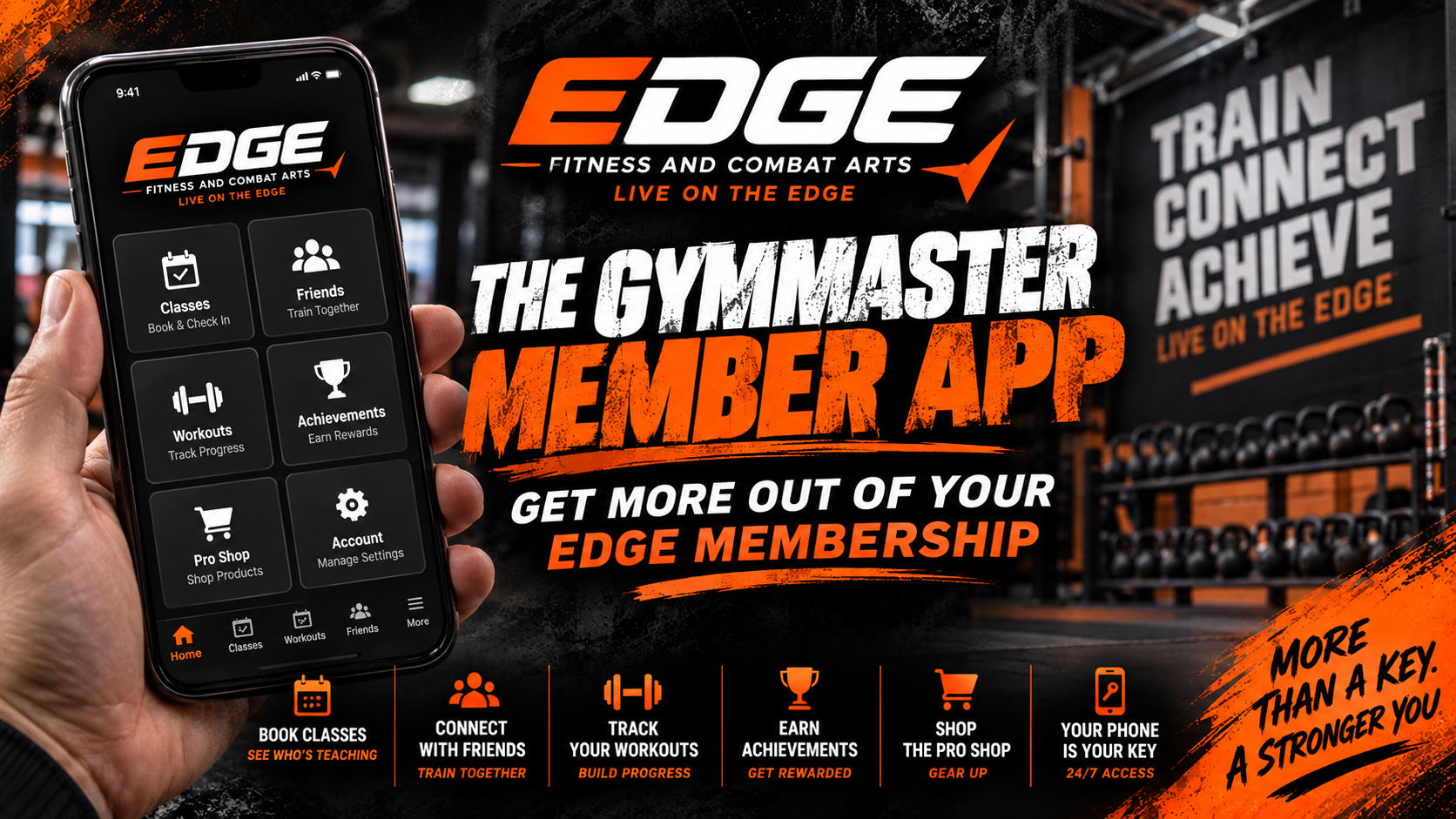
When we first started using the GymMaster Member App at Edge Fitness & Combat Arts, most people probably thought of it as the app that gets you through the front door.
And to be fair, that's a pretty important part of it. If you're a 24/7 member at our Kernersville location, your phone is essentially your key to the gym.
But we've been steadily building out GymMaster to do a whole lot more than open the door. At this point, I think a lot of our members are probably using 20% of what the app can actually do.
You can book classes, see who's teaching, connect with friends, see what classes your friends are attending, track workouts, earn achievements, receive important gym updates, shop our Pro Shop, manage parts of your account, and more.
And we're still adding to it.
So if you're an Edge member and haven't really explored your GymMaster app yet, here's what you're missing.
First, make sure you've actually downloaded the GymMaster Member App and can log in. Your account is connected to the email you used when you joined Edge. If you've forgotten your password, use the password reset option from the login screen instead of creating another account.
Once you're in, turn on notifications.
I know everybody is tired of apps sending them notifications. We are too, and we promise we aren't going to spam you.
We use notifications when there's something you actually need to know. Weather closures, schedule changes, class updates, announcements, reminders, and other time-sensitive information can all come through GymMaster. It's becoming one of the primary ways we communicate important information with our members, so keeping notifications turned on is a good idea.
This is one habit I'd really like our members to develop.
If you're planning on taking a class at Edge, check GymMaster.
You'll be able to see the current class schedule, book your class, and, with a high degree of accuracy, see which instructor is scheduled to teach it.
I say “with a high degree of accuracy” because life still happens. An instructor gets sick, somebody has an emergency, schedules change at the last minute, and occasionally we have to make a substitution. But we're working hard to keep GymMaster updated so that when you look at the schedule, you have a pretty good idea of not only what classes are happening but who you're going to be training with that day.
That's especially helpful if you enjoy training with a particular instructor or want to try classes with different members of our coaching team.
Booking also helps us.
When members consistently reserve their classes and check in when they arrive, we get much better information about which classes are growing, which times are busiest, where we may need additional instructors or equipment, and where we might eventually need to add another class.
So when you know you're coming, book it.
Then when you arrive, hit CHECK IN. If you've already booked your class, checking into the gym will also check you into that class.
This might be my favorite part of the app that most people aren't using yet.
You can actually add other Edge members as Friends inside GymMaster.
Once you connect, GymMaster becomes a lot more social. Instead of texting your workout partner back and forth trying to figure out, “Are you going tonight?” you can see the classes your friends have booked and book yourself into the same class.
So maybe you open GymMaster and see that three of your friends are booked for the 6:00 PM Thai Boxing class tonight.
Well, I guess you're training Thai Boxing tonight.
Or maybe you've been putting off that 5:30 AM Group Fitness class, and then you see your friend has already booked it.
Now you've got one less excuse. 😂
That's the part of technology around fitness that I actually like. It isn't replacing the community of the gym. It's helping the community connect.
You can coordinate workouts, meet your friends for classes, encourage each other to show up, compare visits and streaks, celebrate achievements, and create a little friendly competition along the way.
GymMaster also gives you control over who you connect with. Friend requests have to be accepted, and members can remove or block connections, so you're not automatically sharing your activity with everyone at the gym.
And there's another reason to bring your friends to Edge: if you refer a friend who joins, you can earn a free Edge gym shirt.
Of course, we can't talk about GymMaster without mentioning one of its most important jobs.
For our Kernersville 24/7 members, when the gym isn't staffed and the doors are locked, open GymMaster and use the CHECK IN button to gain access.
We've moved away from relying on physical key tags because most of us already carry our phones everywhere anyway. As long as your membership is active and your phone is set up correctly, you've got your gym access right there with you.
Just don't leave your phone at home.
Then you're doing cardio in the parking lot.
There's also a Workouts section inside the app that I think has a lot of potential for our members.
Our trainers can use GymMaster to assign workout plans, including exercises, sets, reps, weights, and other information. You can then follow those workouts and record what you actually did.
That gives us a much better way to track progress than trying to remember what weight you used three weeks ago.
And we're going to continue developing this side of GymMaster.
Our goal is to give members more ways to track workouts, goals, progress, and trainer-assigned plans right from the same app they're already using to get into the gym.
We're also building achievements and rewards into GymMaster.
Your attendance matters. Your consistency matters. And now we can actually recognize some of those milestones.
GymMaster can track things like visits, attendance streaks, classes and achievements. We're using some of those accomplishments to give members real rewards, including things like shirts, sweat towels, merchandise, and even free personal training sessions.
This isn't meant to turn working out into a video game.
But if seeing that you've been consistent for several weeks gives you a little extra motivation to show up one more day, I'm all for it.
And when your friends are connected through the app, you can encourage each other and have some fun seeing who's actually showing up.
We've also started moving our Pro Shop into GymMaster.
Open the app, tap the three lines in the upper-left corner, and select Buy Products. From there, you can purchase available shirts, drinks, gloves, personal training sessions, and other products as we add them.
When you purchase something through the app, the card you already have on file with Edge is automatically charged.
The Pro Shop is still very much a work in progress. We're adding products, updating what's available, and figuring out how to make the whole thing more convenient. So if you haven't checked it lately, take another look.
There's probably going to be more there over time.
This is really what all of this comes down to.
We don't want GymMaster to just be another app sitting on your phone.
We want it to make your experience at Edge better.
Before you come to the gym, open it and see what's happening. See who's teaching tonight. Find out what class your friends booked and jump in with them. Reserve your spot. When you arrive, check in. Track your workouts. Build some streaks. Earn some rewards. Check out the Pro Shop. And make sure your notifications are on so you don't miss something important.
We're going to continue adding to it and finding better ways to use it.
The technology isn't supposed to replace the relationships and community inside the gym. It's supposed to make it easier for you to be part of them.
So open your GymMaster app, add a few of the people you train with, book your next class together, and start using more of what your Edge membership already gives you.
And if you have no idea how to do any of this, grab one of us at the front desk.
We'll help you get it set up.
Train. Connect. Achieve. Live on the Edge.
Use the email address associated with your membership and the app’s password recovery option. If you are still stuck, visit Member Resources or ask our team to help verify your account.
Check the location, date, and membership inclusions first. If a class is not available to book or you are unsure which plan covers it, contact our team before buying another membership.
Open the app menu and look for Buy Products. Available products and menu labels can change. Ask the front desk if you cannot find an item or need help with a purchase.
Check your app version and account setup, then ask our team for help. Available features depend on the app and how the gym has configured them.
Check the confirmation and your account details. If you are requesting a membership change, cancellation, or billing correction, contact our team and follow the current membership policy rather than assuming an app action completed the request.
See class times and staffed gym hours, compare memberships, or request a free trial class or gym tour. Trial requests are confirmed by our team.
Find your fit at Edge Fitness & Combat Arts. Explore our gym, group fitness, and martial arts memberships and start your journey today.
Start Your Membership Here
.png)







.png)
.png)


.png)
.png)
.png)
.png)
.png)
.png)
.png)
.png)
.png)
.png)
.png)
.png)